How to Ask for Testimonials (Email Templates + Scripts)
70% of customers will leave a testimonial when asked. Get 8 proven email, SMS, and LinkedIn templates with exact scripts and follow-up sequences [2026].
Let's be honest: you already know you need testimonials. You're just stuck on what to actually say when you ask.
Most guides give you "timing tips" and "channel strategies." That's fine. But you didn't come here for theory. You came here for copy-paste templates you can send in the next five minutes. That's exactly what this post is.
TL;DR: 70% of customers will leave a review when asked directly (Search Engine Land, 2024). The difference between a 5% and 40% response rate comes down to your template. Below are 8 tested templates for email, SMS, LinkedIn, and video requests, plus a follow-up sequence that works.
How do you ask customers for a testimonial? Send a personalized email 3-7 days after a positive outcome, reference their specific results, and include a fill-in-the-blank prompt like "Before [Product], I struggled with ___. Now I ___." This approach gets 30-40% response rates compared to 5% for generic "leave us a review" requests.
Most Testimonial Requests Fail for One Reason
The number one reason testimonial requests fail isn't that customers don't want to help. It's that the ask is vague and gives them nothing to work with.
Key finding: 69% of customers have left reviews after being prompted by a business (Famewall, 2025).
That means the problem isn't willingness. It's the ask itself.
Here's what kills response rates: "Would you mind writing us a testimonial?" forces your customer to stare at a blank text box and think "What do I even say?" That's not a request. That's homework.
The fix is simple. Give them a specific prompt, keep it short, remove friction. The 8 templates below do that.
My take: I've tested dozens of variations and the pattern is always the same. Specificity wins. Reference something real they said or achieved, give them a fill-in-the-blank prompt, and let them reply by email. Response rates jump from single digits to 30%+.
For the full timing strategy and channel playbook, see our testimonial request strategies guide.
Template 1: The Post-Purchase Email
This is your bread-and-butter template. Send it 3-7 days after purchase when the customer has had time to use your product but the excitement is still fresh.
Subject: Quick question about your experience with [Product]
"Hey [Name],
You've been using [Product] for about a week now. How's it going?
I'm curious: what's the biggest difference you've noticed since switching from [old method/tool]? Even one sentence helps us show other [industry] teams what's possible.
Here's a prompt if it helps: 'Before [Product], I struggled with ___. Now I ___.'
Just hit reply. No forms, no logins.
[Your name]"
Why it works: References their specific situation, gives a fill-in-the-blank prompt, and removes friction by asking for an email reply instead of a form. Personalized subject lines see a 26% boost in open rates (Marketing Dive, 2024).
Template 2: After a Positive Support Interaction
Why it works: The frustration-to-relief arc creates natural storytelling. Customers who just had a problem solved are primed to articulate exactly what your team did right.
Support tickets that end well are testimonial goldmines. The customer was frustrated, you fixed it, and they're grateful. That emotional arc is exactly what makes a compelling testimonial.
Subject: Glad we got [specific issue] sorted out
"Hi [Name],
Really glad we got [specific issue] resolved for you. Sounds like [specific positive outcome] is back on track.
Quick ask: would you be open to sharing a line or two about your experience? Other customers find it helpful to know that when things go sideways, our team actually fixes them fast.
Totally optional. Just reply here if you're up for it."
My take: Support-triggered testimonials are the most underused template I've seen. People expect companies to solve problems. When you do it well, the surprise factor creates testimonials that are genuinely enthusiastic. Don't sleep on these.
Template 3: The LinkedIn DM Template
LinkedIn works better than you'd expect for B2B testimonial requests. The person is already in "professional mode," and your message isn't buried under 50 other emails.
Message:
"Hey [Name], hope things are going well at [Company].
Quick one: you mentioned [specific result or comment] a few weeks back, and it stuck with me. Would you be open to sharing a 2-sentence version I could use as a testimonial on our site?
I'd credit you with your name and title, and link back to your profile. Happy to draft something based on what you told me if that's easier.
No pressure at all."
Why it works: LinkedIn DMs feel personal, not transactional. Offering to draft it for them removes the "I don't know what to write" barrier. And linking back to their profile gives them a small professional benefit.
Template 4: The SMS Template
SMS gets 45% response rates compared to email's 6% (Birdeye, 2025). If you have your customer's phone number and already text them, this is the obvious choice.
Message:
"Hey [Name]! Quick question: what's been the biggest win you've had with [Product] so far? Even a sentence or two would mean a lot. Just reply here. - [Your name]"
When to use SMS vs email
| Channel | Response Rate | Best For | Watch Out For |
|---|---|---|---|
| SMS | 45% avg | B2C, local businesses, existing text relationships | Don't text cold contacts. Feels invasive. |
| 6-15% avg | B2B, SaaS, longer testimonials | Gets buried. Needs strong subject line. | |
| LinkedIn DM | 15-25% avg | B2B professionals, executives | Keep it short. Wall of text = ignored. |
| In-person | 85%+ | Events, client meetings | Needs follow-up to capture it in writing |
My take: SMS is the most underrated channel for testimonial collection. The average response time for a text is 90 seconds versus 90 minutes for email (SimpleTexting, 2025). But only use it when you already have a texting relationship. An unsolicited text asking for a testimonial feels like spam.
Template 5: The Video Testimonial Request

Video testimonials boost landing page conversions by 34% compared to text-only pages (Testimonial Hero, 2025). But asking someone to record a video feels like a big ask. The key is making it feel casual and low-stakes.
Subject: Would you be up for a 60-second video?
"Hey [Name],
This is a slightly bigger ask than usual, so feel free to say no.
We're putting together a few short customer stories for our website. Would you be open to recording a quick 60-second video on your phone? No script needed. Just answer this one question:
'What's the one thing [Product] does that you couldn't do before?'
You can record it selfie-style, in your office, wherever. We'll handle the editing. And if you'd rather do a Zoom call where I ask you questions, that works too.
[Your name]"
Why it works: Sets expectations (60 seconds, phone, no script), gives one specific question, and offers an alternative (Zoom call) for people who freeze on camera.
Not sure whether to push for video or stick with text? Read our comparison of video vs text testimonials.
Video vs text: a quick breakdown
| Format | Conversion Impact | Completion Rate | Best For |
|---|---|---|---|
| Video | +34% landing page conversion | Lower (10-15% of asks) | Homepage, sales pages, social media |
| Text | +22% conversion rate | Higher (30-40% of asks) | Pricing pages, emails, embedded widgets |
I've found that the sweet spot is asking for text first, then upgrading your best text testimonials to video. The customer already knows what they want to say, which makes the video less intimidating.
Template 6: Post-Event or Webinar Follow-Up
Events and webinars create a natural high that fades fast. Send this within 24 hours while the energy is still there.
Why it works: That post-event buzz disappears within 24-48 hours. Catching people while the energy is fresh gets you testimonials with specific, vivid details.
Subject: Thanks for joining [Event Name] - quick question
"Hey [Name],
Thanks for coming to [event/webinar]. Loved the energy in the room.
Quick question: what was your biggest takeaway from the session? Or if you've been using [Product] already, what's been the most useful part for you?
I'm collecting a few short quotes for our site. Even a sentence or two helps.
Just reply here. Appreciate you.
[Your name]"
Post-event feedback sent within 24 hours gets 20-30% response rates. Wait longer than 48 hours and that drops below 10% (Clootrack, 2025).
Template 7: The Renewal or Upgrade Moment
When a customer renews their subscription or upgrades their plan, they've just voted with their wallet. That's the strongest signal of satisfaction you'll get.
Subject: Congrats on the upgrade - quick ask
"Hey [Name],
Saw that you just [renewed for another year / upgraded to the Pro plan]. That's awesome, and honestly it means a lot.
Since you've been with us for [timeframe], would you be open to sharing what's kept you around? I'm looking for the honest version, not the marketing version.
Here's a prompt: 'I renewed because ___. The thing that surprised me most was ___.'
Reply here if you're game. And thanks for sticking with us.
[Your name]"
My take: Renewal-moment requests convert at nearly 2x the rate of random asks. The customer has just made a buying decision and can articulate exactly why. Their reasoning is fresh and specific, which is exactly what makes a testimonial useful.
Template 8: Cold Outreach to a Known Happy Customer
You know they're happy. They've told you privately, praised you on calls, or their usage data screams satisfaction. But you've never formally asked. Here's how to fix that.
Subject: I've been meaning to ask you something
"Hey [Name],
This is long overdue, but I've always appreciated how [specific thing: they stuck with you through the early days, they referred you a client, they gave great product feedback].
Would you be comfortable sharing a few words about your experience with [Product]? I'd use it on our website to help other [industry] teams understand what it's like to work with us.
I can draft something based on what you've told me before if writing from scratch feels like a chore. You'd just need to approve it.
[Your name]"
Why it works: Acknowledges the relationship history, makes the ask feel overdue (not opportunistic), and offers to do the heavy lifting.
Want to generate personalized versions of any of these templates in seconds? Our free Testimonial Email Generator creates custom requests based on your client's name, project, and results.
The Follow-Up Sequence That Doubles Your Response Rate
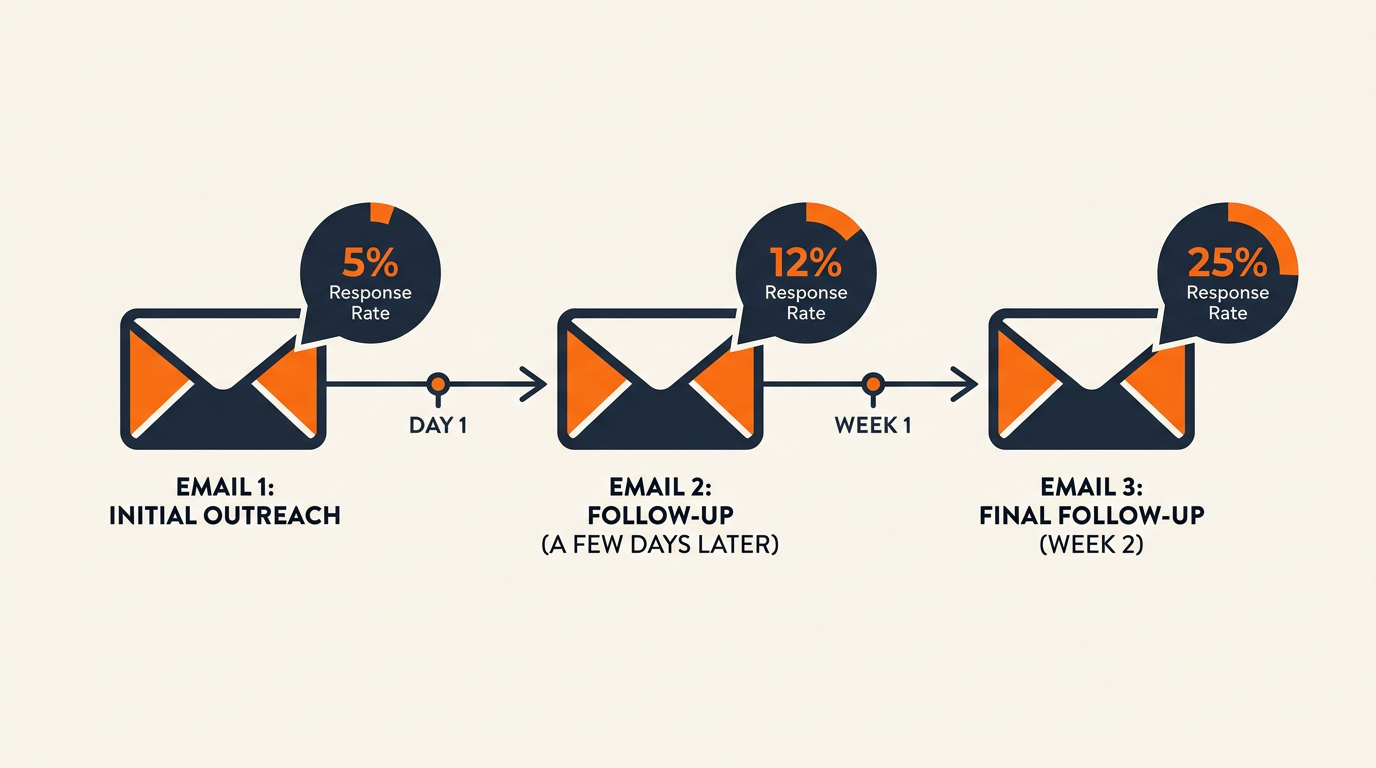
One email and hope is not a strategy.
Key finding: 70% of people stop after one outreach attempt, but adding follow-ups triples response rates (Snovio, 2025).
Here's the exact sequence:
Day 0: Initial request (use any template above)
Day 5-7: The gentle bump
"Hey [Name], floating this back up in case it got buried. Zero pressure. If now's not a good time, just say so and I'll stop bugging you."
Day 12-14: The final ask with an easy out
"Last one from me on this. If you'd rather not or the timing's off, totally understand. Just reply 'pass' and I'll take you off the list. Otherwise, even one sentence about [specific result] would be amazing."
After two follow-ups, stop. Period. A third attempt crosses from persistent to annoying.
My take: The "reply pass" trick in follow-up #2 is the best thing I've added to our sequence. It respects boundaries, reduces guilt, and paradoxically gets more people to actually write the testimonial. Giving someone an easy exit makes the other option (writing it) feel more like a choice.
Timing your follow-ups
Pro tip: if you sent the original request on Monday morning, send the follow-up on Thursday afternoon. People have different email rhythms on different days. A request buried in Monday's inbox avalanche might get noticed on a quiet Thursday.
What to Do When Someone Says No
Not everyone will say yes. That's fine. But how you handle a "no" matters more than you'd think.
Respect it immediately. "No problem at all, thanks for considering it" keeps the relationship intact. Never negotiate.
Offer alternatives. Some people are uncomfortable with public endorsements but fine with anonymous quotes. "Would you be open to sharing feedback we'd only use internally?" often gets a yes.
Listen for the signal. If multiple customers decline, the problem might not be testimonials. It might be their experience with your product. Ask: "Is there anything we could have done differently?" Some of the most useful feedback comes from people who won't endorse you publicly.
Once you've built a collection of testimonials, organize them by use case and display them where they'll actually drive conversions. A well-designed Wall of Love makes your best quotes impossible to ignore.
FAQs About Asking for Testimonials
Here are the quick, no-nonsense answers to the questions that come up every single time.
What's the best email subject line for a testimonial request?
Reference something specific to them. "Quick question about [specific result they got]" beats generic subjects like "We'd love your feedback" every time. Personalized subject lines boost open rates by 26% (Marketing Dive, 2024). Name a project, a result, or something they told you. It should feel like a 1:1 conversation, not a mass blast.
Should I offer incentives for testimonials?
For B2C, small incentives work (discounts, early access). For B2B, they can feel transactional and undermine the testimonial's credibility. Better approach: make the process rewarding instead. A simple, specific prompt that takes 30 seconds beats a $25 gift card that makes people question whether the testimonial is genuine.
How do I ask for a video testimonial without scaring people off?
Start with text. Once someone writes a great text testimonial, follow up: "This is great. Would you be open to saying the same thing on a 60-second phone video?" They already know what to say, so the biggest barrier is gone. Video testimonials convert 34% better than text on landing pages (Testimonial Hero, 2025), but only 10-15% of people will say yes to video cold.
The real question isn't "video or text?" It's "which format matches this customer's comfort level?" A genuine text testimonial beats a stiff, forced video every time.
How many follow-ups should I send?
Two maximum. After that, you're damaging the relationship. The sequence is: initial request, one gentle bump at day 7, one final ask with an easy opt-out at day 14. If they haven't responded after two follow-ups, they're not going to.
Can I use something a customer said in an email or on social media as a testimonial?
Yes, but always ask permission first. Pull the exact quote, send it to them, and say: "Would you be comfortable with us using this on our site?" This approach gets 50%+ approval rates because you've already done the work. They just say yes.
Key Takeaways
- The template matters more than the timing. A specific, low-friction request sent at an "okay" moment beats a vague ask sent at the "perfect" moment.
- Give prompts, not blank boxes. Fill-in-the-blank prompts ("Before [Product], I ___. Now I ___.") get 4x more responses than open-ended requests.
- SMS crushes email for B2C. 45% response rate vs 6%. If you have a texting relationship, use it.
- Two follow-ups, then stop. The "reply pass" opt-out trick respects boundaries and paradoxically increases conversions.
- Start with text, upgrade to video. Get the story in writing first, then ask your best respondents to record a 60-second version.
Stop Guessing What to Say. Start Collecting.
You've got the templates. Now you need a system. Credibly is an AI-powered testimonial collection tool that automates testimonial requests, uses AI to surface the quotes with the highest conversion potential, and lets you display them on any page with a single line of code.
Start your free trial of Credibly today and turn these templates into a testimonial engine that runs on autopilot.
Written by Credibly Team
We help businesses collect and display customer testimonials that actually convert. No awkward asks. No scattered screenshots. Just social proof that works.
Try Credibly FreeAlso comparing tools? Explore testimonial software alternatives.
Continue Reading
Ecommerce Testimonial Examples: 11 Brands Doing It Right
Real ecommerce testimonial examples from 11 brands driving sales with reviews. Products with 5+ reviews are 270% more likely to sell. Tactics included.
How to Collect Testimonials: Build a System That Scales
72% of customers leave reviews when asked, yet most businesses collect zero. Build a testimonial collection engine with proven timing, channels, and automation
SaaS Testimonial Examples: 11 Companies Doing It Right
See how 11 SaaS companies use testimonials to boost conversions by up to 34%. Real examples with steal-worthy tactics and data-backed strategies inside.